One card. Four kids. And you’re the adult chosen to keep score.
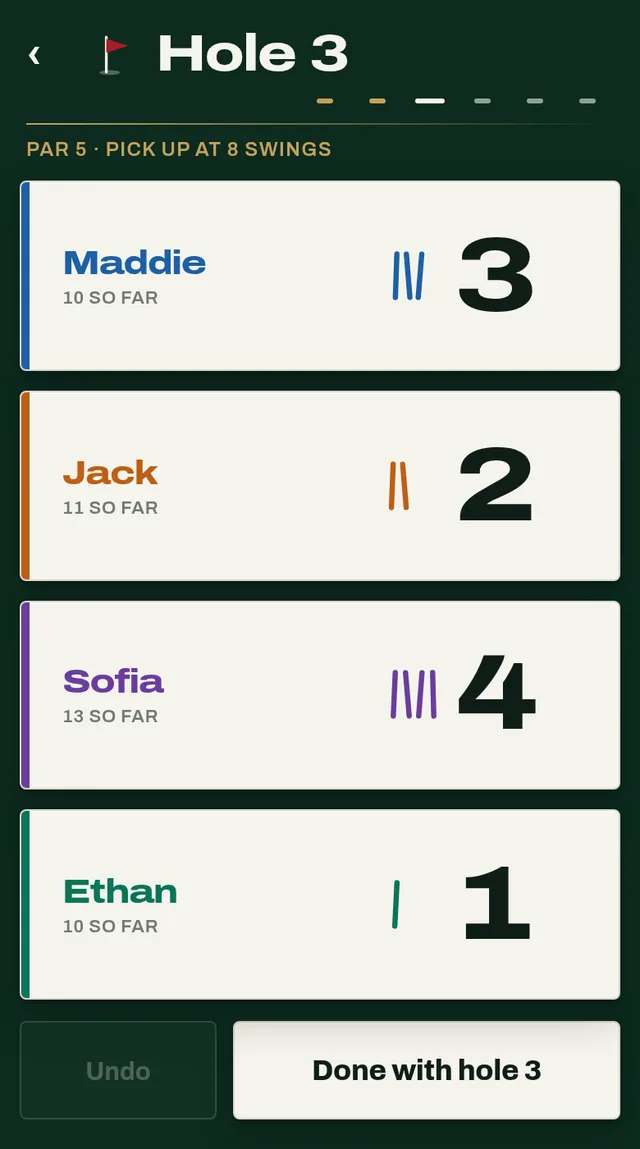
GolfJot is a scorecard on your phone. Tap a player each time they swing, and it does the counting and the adding up.
Made for whoever keeps score, and for the coach who sets the match up beforehand.
Keeping score
No account, and nothing to sign up for.
Coaching
Coach sign-inSet up your roster, the groups and the match before the day.See the coach sideWhat a match looks like from your end.The person holding the card
Watch the swing, not the card
Every swing has to get written down. You’d rather be watching the kids play than looking down to write it.
Tap once per swing
Tap a player once every time they swing.
Practice swings don’t count. Tap when they hit at the ball — and once more for a penalty stroke.
First time keeping score? Read the short guide.
That’s the whole thing.
You never look down to find the right box. You never add anything up.
Works without a signal.
Typing a code needs signal once, at the start. After that, nothing does — scoring works the same in a dead spot, and the card catches up whenever the phone finds signal again.
Set the card up yourself and it never needs a signal at all. No account to make.
What it changes for a coach
Three things, in this order
The first one you can do on your own.
- 1
On your own
Build the groups ahead of time, instead of writing cards out by hand at the last minute.
GolfJot suggests groups from rules you choose: how big each group is, who’s played the course before, who should or shouldn’t play together. You can move anyone.
Nothing changes for anyone else. No app for anyone to learn, no sign-ups, and the match runs exactly as it did.
- 2
When the scorekeepers use it
The cards add themselves up. No handwriting to make out, and no columns to total by hand afterwards.
- 3
When the other teams are in it too
You can follow the match as it happens, instead of collecting every team’s cards at the end and adding them up.
Coach sign-in — set up a roster and a match, or see the coach side first.
Several teams, one coach code
What joining an event involves
The host shares a coach code. Each coach types it in and marks which of their own players are available. That’s all of it.
Your scorekeepers don’t need an account, you don’t hand over your roster, and nothing carries past that one event.
What crosses between teams
The names you mark, and nothing else
A host sees the players you mark available for that event. Not the roster they came from, not the players you didn’t mark, and nothing else about your team.
Two details can help with pairing: whether a player has played the course before, and whether they’re a girl, for leagues that require one in each group. Both stay with the player’s own coach unless that coach chooses to send them, for one event.
What it costs
Keeping score is free, always — no account.
Coaches get their first 3 matches free, then a Season Pass is $39 for a full year. No subscription, no automatic renewal.
This page and the coach area count visits with Google Analytics. Keeping score never does.
© 2026 B3 Trinitas · GolfJot